
Best overall: monitored video with a defined response plan. Best for sites without permanent infrastructure: a mobile surveillance tower. Best budget-focused option: a trailer intrusion alarm for enclosed storage. This 2026 guide compares the best security systems for construction sites by the job each system does—not by camera count.
- The best security systems for construction sites connect detection, verification, and a named response.
- Monitored video is the default for unattended sites; mobile surveillance towers suit changing layouts.
- Trailer intrusion alarms protect enclosed storage, not an entire construction perimeter.
- Firstlinefire offers security and fire-protection services for commercial and industrial customers.
Why this matters
A camera records. A security plan tells someone what to do when that camera shows an intruder. If nobody owns the next step, you have evidence collection rather than a complete response arrangement.
Construction changes the problem as work advances. A delivery blocks yesterday's view. A new opening becomes an entrance. A trailer moves, taking its power connection with it. Your 2026 security plan needs to follow those changes.
Firstlinefire provides security, fire alarms, and fire-protection services to commercial and industrial customers across Kentucky, Illinois, Indiana, Tennessee, Missouri, and Alabama. Firstlinefire is a fit for commercial operators seeking security and fire-protection services from one provider. Confirm the proposed construction-site scope before selecting equipment.
What makes the best construction-site security system
Use these criteria before comparing proposals:
- Detection: The system must detect activity at the entrances, storage areas, or boundaries you actually need to protect.
- Verification: Video or another agreed check must help distinguish an intrusion from authorized work, deliveries, or environmental movement.
- Response ownership: Name who receives an alert, who reviews it, and who contacts the designated responder.
- Power and communication: Specify how the system operates at the proposed mounting point and what happens when power or connectivity fails.
- Layout flexibility: Equipment placement must accommodate changing fences, access roads, scaffolding, and storage.
- Usable evidence: Check nighttime images, event retrieval, recording access, and the ability to export footage.
Do not accept a proposal that describes equipment but leaves these responsibilities blank. A feature list does not establish who answers an alarm.
Construction-site security options at a glance
These are system configurations, not manufacturer rankings. Each option has a distinct primary use; several can work together on the same job site.
| Rank and system | Best for | Standout function | Key limitation |
|---|---|---|---|
| 1. Monitored video | Unattended sites needing event verification | Connects camera events to an agreed monitoring workflow | Monitoring scope and response rules require explicit agreement |
| 2. Mobile surveillance tower | Open sites with changing infrastructure | Relocatable camera mounting and equipment platform | Power, communication, placement, and blind spots need checking |
| 3. Trailer intrusion alarm | Enclosed tool and equipment storage | Detects entry into a defined enclosure | Does not cover outdoor materials or the full perimeter |
| 4. Perimeter intrusion detection | Sites with a defined boundary | Detects activity at a configured boundary | Authorized traffic and environmental conditions complicate setup |
| 5. Gate access control | Sites needing controlled worker and vehicle entry | Manages credentials at a designated entrance | Does not secure gaps elsewhere in the fence |
| 6. Recorded camera system | Staffed sites prioritizing incident review | Stores video for later review | Recording alone does not provide an active response |
1. Monitored video: best security system for unattended sites
Monitored video connects camera events to a person or service assigned to review them. Specify the coverage hours, event triggers, verification method, and escalation instructions. The monitoring agreement determines the response—not the word monitored on a brochure.
Start with the places where a person can enter or remove property. Ask for an after-dark demonstration using the actual camera positions, lighting, and communication connection proposed for your site.
Monitored video pros:
- Provides visual context for an alarm event.
- Supports an agreed escalation process.
- Can cover entrances and exposed storage together.
Monitored video cons:
- Occluded views leave gaps in verification.
- Poorly defined escalation rules leave responsibility unclear.
Best for: A construction site left unattended outside working hours, where you need someone assigned to review events.
For your 2026 proposal, require written instructions for an unanswered contact call. The alarm monitoring and central dispatch workflow explains the handoffs to review with a provider; confirm how those handoffs apply to security events.
Verdict: Buy monitored video when verified alerts and response ownership are the main requirement.
2. Mobile surveillance tower: best security system for changing sites
A mobile surveillance tower provides a relocatable platform for cameras and associated equipment. It suits a site where permanent mounting points are absent or where coverage needs to move with construction phases. Do not assume every tower includes independent power, cellular communication, or live monitoring.
Specify those functions separately. Place the tower around sightlines and access routes, not simply where delivery is easiest.
Mobile surveillance tower pros:
- Offers a mounting option without relying on a finished building.
- Can be repositioned as work areas change.
- Groups surveillance equipment on a defined platform.
Mobile surveillance tower cons:
- Stored materials and equipment can block its views.
- Relocation requires another coverage and connection check.
Best for: An open construction site with changing storage areas and limited permanent infrastructure.
Before accepting the installation, check 3 locations: the gate, the material storage area, and the equipment parking area. Treat these as a starting checklist, not proof that every site needs the same camera layout. Add other locations identified in your site review.
Verdict: Buy a mobile surveillance tower when relocation and mounting flexibility matter more than permanent installation.
3. Trailer intrusion alarm: best security system for enclosed storage
A trailer intrusion alarm detects entry or movement within a defined enclosure. Door contacts address openings; suitable interior detectors address activity inside. The proposed equipment must match the trailer's conditions and the way your crew uses it.
This is a focused option. It protects the enclosure, not machinery parked outside or materials stored beyond the trailer door.
Trailer intrusion alarm pros:
- Targets a clearly defined storage space.
- Can identify the opening or detection zone involved.
- Gives crews a specific area to arm and disarm.
Trailer intrusion alarm cons:
- Leaves outdoor assets outside its detection scope.
- Requires clear responsibility for access codes and arming.
Best for: A small job site whose main security concern is tools or equipment inside a locked trailer or container.
For a 2026 installation, ask how the alarm communicates after a site move and how power loss is reported. Keep the keyholder list current. A departed subcontractor should not remain an authorized user.
Verdict: Buy a trailer intrusion alarm for enclosed storage; skip it as the sole system for an open site.
4. Perimeter intrusion detection: best security system for defined boundaries
Perimeter intrusion detection uses suitable sensors to detect activity along a configured boundary. The arrangement can involve fence-mounted detection or outdoor detection zones, depending on the design. A stable boundary makes placement and event interpretation easier to manage.
The important question is what crosses that boundary legitimately. Deliveries, workers, vegetation, and nearby activity belong in the design review before the system is armed.
Perimeter intrusion detection pros:
- Focuses detection on the site's outer boundary.
- Can divide the boundary into identifiable zones.
- Can complement cameras used to verify events.
Perimeter intrusion detection cons:
- Boundary changes require configuration review.
- Detection alone does not identify the cause of an event.
Best for: A fenced construction site with clearly defined entry points and a boundary that remains reasonably stable during the protected phase.
Require a demonstration at representative sections of the boundary. Confirm who adjusts detection when the fence moves and who reviews repeated unwanted alerts.
Verdict: Buy perimeter intrusion detection for a defined boundary; wait if the boundary is still being established.
5. Gate access control: best security system for managed entry
Gate access control manages entry through a designated opening using approved credentials or another configured authorization method. It helps you grant and withdraw access without treating every worker as a permanent keyholder. Where entry records are required, include that function explicitly.
A controlled gate is not a controlled site if another opening remains accessible. Walk the entire boundary before treating gate access as the main security measure.
Gate access control pros:
- Centralizes authorization at a defined entrance.
- Supports removal of access when a worker leaves.
- Can separate access permissions by approved user groups.
Gate access control cons:
- Shared credentials weaken individual accountability.
- Uncontrolled openings bypass the gate entirely.
Best for: A construction project with recurring worker, subcontractor, and vehicle access through a managed entrance.
Keep emergency access and safe exit arrangements separate from convenience decisions. Have the responsible designer and applicable authority review the proposed arrangement before installation.
Verdict: Buy gate access control when managing authorized entry is the main problem; skip it as a substitute for perimeter protection.
6. Recorded cameras: best security system for incident review
A recorded camera system stores footage for later viewing. It suits a staffed site where the main requirement is reviewing deliveries, access disputes, or reported incidents. Define who can retrieve recordings and how footage is preserved after an event.
Do not confuse remote viewing with active monitoring. The ability to open a camera app does not establish that anyone will watch it when the site is empty.
Recorded camera system pros:
- Provides a visual record of covered areas.
- Supports review of a reported event.
- Can document activity at gates and delivery points.
Recorded camera system cons:
- Recording does not create an immediate response.
- Missing views or overwritten footage limit incident review.
Best for: A staffed construction site prioritizing evidence and operational review rather than unattended event response.
Run 1 after-dark walk test before accepting the camera positions. Review the recording, not just the live image. Confirm that the footage shows the activity you need to assess.
Verdict: Buy recorded cameras for incident review; skip recording-only coverage when active response is required.
How the ranking works
The ranking follows detection, verification, response ownership, power and communication, layout flexibility, and usable evidence. Monitored video is the default because it can connect observation to an assigned response workflow. The other configurations win when a narrower site requirement takes priority.
This is a selection guide, not a field-test ranking of named products. Firstlinefire's stated service scope includes security and fire protection; confirm the equipment, monitoring arrangement, installation responsibilities, and service coverage in the actual proposal.
Set the response plan before installation
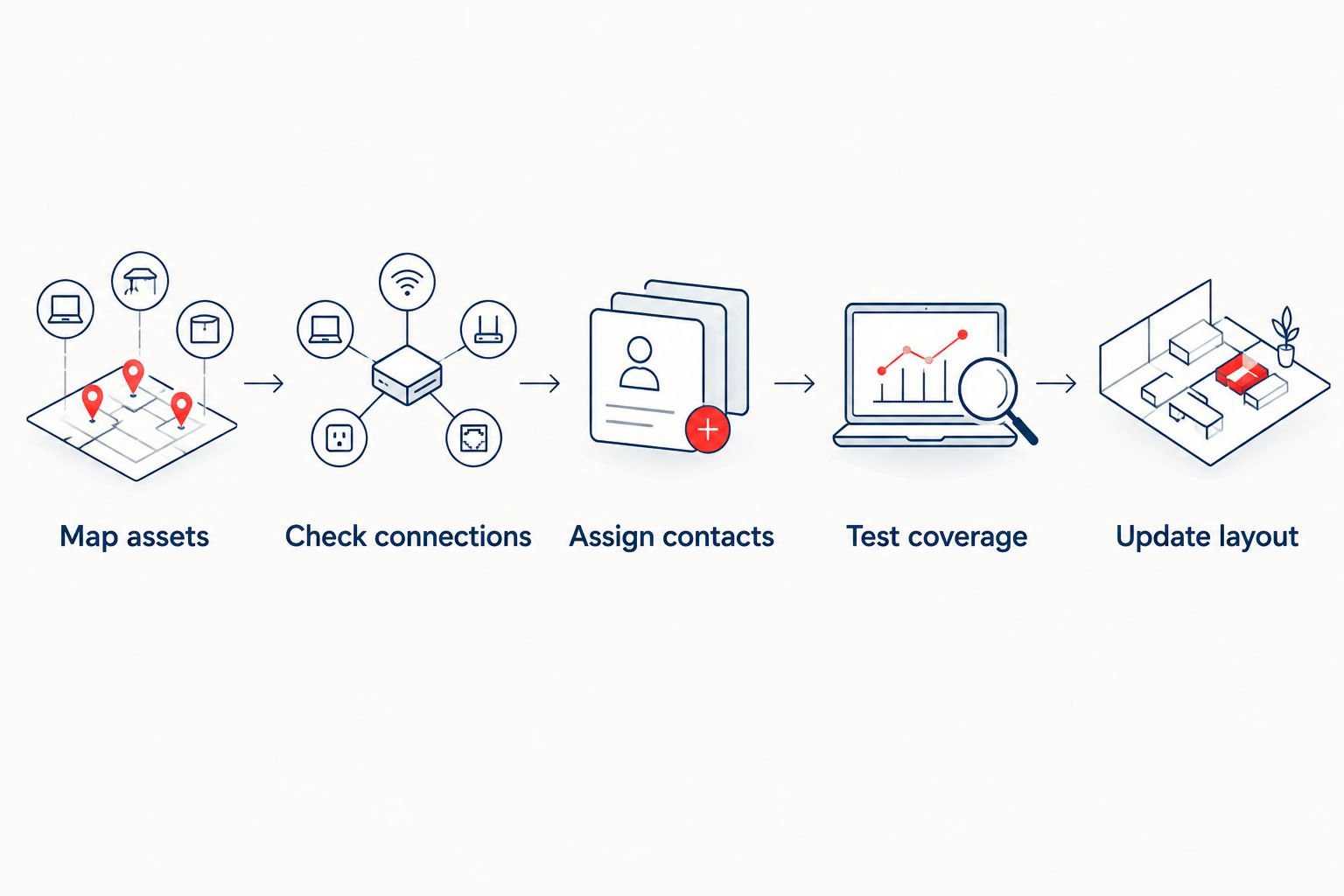
Use this sequence when reviewing your 2026 security scope:
- Map assets: Mark entrances, stored materials, equipment, trailers, and areas outside the proposed views.
- Check connections: Confirm power and communication at the equipment locations, including failure reporting.
- Assign contacts: Name 2 contacts: a primary contact and a backup contact, with clear escalation instructions.
- Test coverage: Walk the protected areas and review the resulting events and recordings.
- Update layout: Recheck coverage when gates, storage, trailers, or work areas move.
Keep security instructions distinct from fire procedures. A security alert does not replace a fire alarm, extinguisher provision, or emergency plan. Firstlinefire provides both security and fire-protection services, but each responsibility still needs a named owner.
Which construction-site security system should you choose?
Choose monitored video with a written response plan if you are undecided and the site is unattended. Choose a mobile surveillance tower when the mounting platform must move. Add trailer alarms, perimeter detection, or gate access control where those specific risks exist.
For a 2026 purchase, ask the provider to explain an intrusion from detection through final handoff. If the explanation stops at an app notification, decide who takes over before signing.
Review your site security needs
Discuss security and fire-protection service needs with Firstlinefire.
FAQ
What's the best security system for an unattended construction site?
Monitored video with a defined response plan is the default choice for an unattended construction site. Confirm coverage hours, event verification, escalation instructions, and communication failure reporting in writing.
Is a mobile surveillance tower better than fixed cameras?
A mobile surveillance tower is better suited to a construction site that needs relocatable mounting. Fixed cameras suit established mounting locations; either arrangement needs verified sightlines, power, and communication.
Can a trailer alarm protect the whole construction site?
A trailer alarm does not protect the whole construction site. It detects activity within its configured enclosure or zones, leaving outdoor assets and other entrances outside that scope.
Are security cameras enough to stop construction-site theft?
Security cameras alone do not guarantee that theft will be stopped. Cameras provide observation or recordings; a response plan assigns someone to review events and take the agreed action.
Do construction-site cameras need Wi-Fi?
Construction-site cameras do not necessarily need Wi-Fi. Communication depends on the selected equipment and can use wired networking or suitable cellular connections; confirm the proposed arrangement at the actual site.
What should happen when construction-site power fails?
The security proposal should define backup operation and power-loss reporting. Ask which functions remain operational, how the failure reaches the responsible contact, and what requires an on-site check.
Can one provider handle security and fire-protection services?
Firstlinefire provides security, fire alarms, and fire-protection services to commercial and industrial customers. Confirm the construction-site scope and keep security escalation instructions distinct from fire emergency procedures.
One last thing
Recheck the view after a delivery. A correctly installed camera can lose sight of the gate behind a newly stacked load. Give the person managing deliveries responsibility for flagging blocked views—not just the person managing security equipment.